


AlphaTRAK 3 Starter Kit For Dogs, Cats & Horses - US 5120
AlphaTRAK 3 Starter Kit For Dogs, Cats & Horses - US 5120
- 3 sold in last 10 hours
Couldn't load pickup availability
- 3 customers are viewing this product
- We offer worldwide shipping to all countries and regions
- Free shipping is available on all orders
- The return request is submitted within 30 days of confirmed delivery


Monitor Your Pet’s Glucose Levels Accurately
Product Description
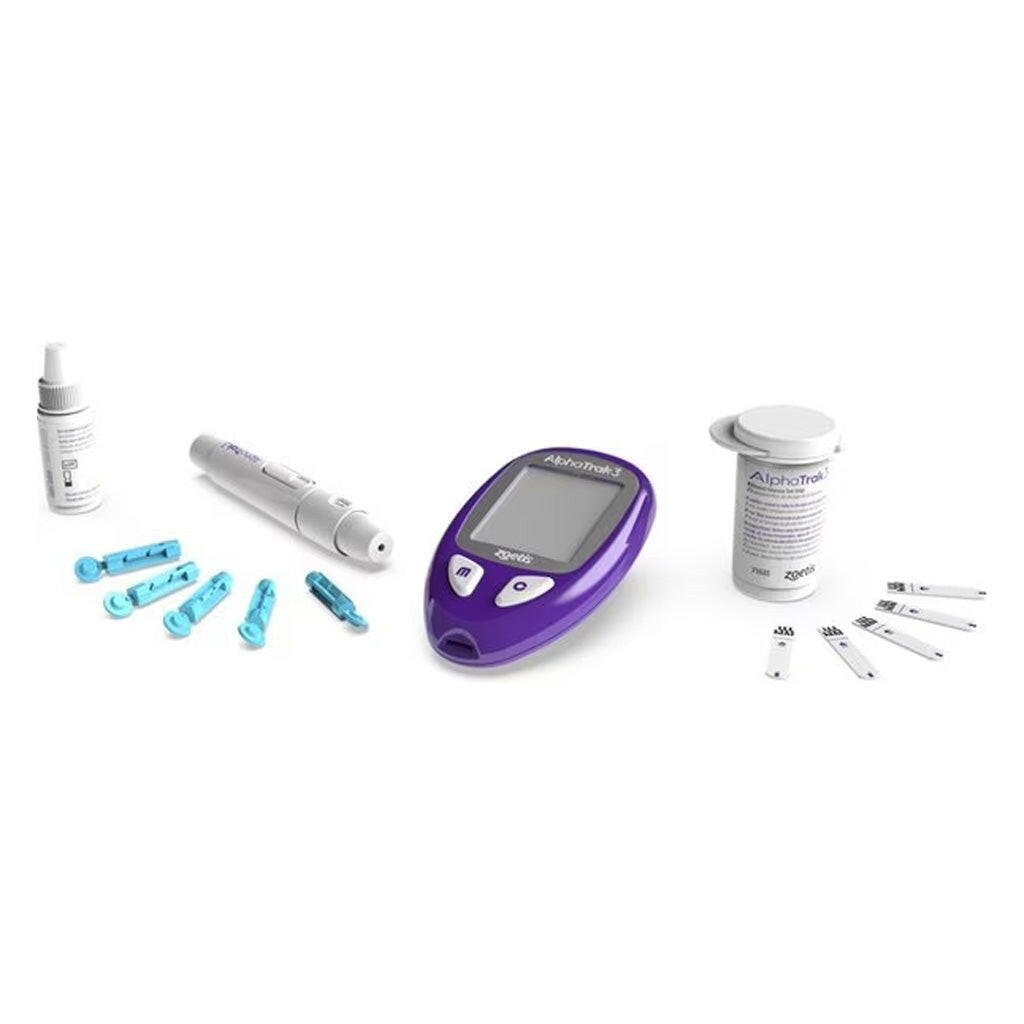
AlphaTRAK 3 Blood Glucose Diabetic Monitoring Kit for Cats, Dogs, and Horses helps you keep your pet healthy and diabetes under control. Specifically calibrated for cats, dogs, and horses, it delivers fast, accurate results from a tiny blood sample. The complete starter kit, paired with the AlphaTrak Mobile App, allows effortless tracking, vet sharing, reminders, and proactive care for your furry friend.
It includes:
- AlphaTrak 3 Pet Glucose Monitor
- AlphaTRAK 3 Test Strips, 50 Count
- AlphaTRAK Lancets, 30 Count
- Lancing device
- AlphaTRAK 3 Control Solution
- Pet Diabetes Diary
- User Guides and Carrying Case
Benefits
- Accurate Blood Glucose Testing: Provides precise results using only 0.3 ml of blood in as little as five seconds.
- Wide Glucose Detection Range: Detects glucose levels from 20–750 mg/dL, covering all potential ranges for cats, dogs, and horses.
- Mobile App Integration: Review, graph, and share glucose results with your veterinarian for smarter diabetes management decisions.
- Complete Starter Kit: Includes meter, test strips, lancing device, control solution, diary, and carrying case for convenience.
- Proactive Pet Care: Set reminders and notifications to ensure consistent monitoring and keep your pet’s health on track.
How to Use
Directions for Use
Perform a Control Test
- Turn On the Meter: Insert a test strip into the meter to automatically turn on the device for testing.
- Select the Correct Species: Set the correct species code on the meter before applying control solution for accurate results.
- Activate Control Test Mode: Press and hold the appropriate button for three seconds until control solution icon displays clearly.
- Prepare the Control Solution: Gently invert the control solution bottle to mix contents before applying a drop to strip.
- Apply Control Solution to Strip: Place a single drop of control solution onto the bottom edge of the test strip carefully.
- Read and Compare Results: Wait a few seconds for results and compare with the test range printed on vial.
Perform a Glucose Test
- Gather Supplies: Collect all necessary items, including AlphaTRAK 3 meter, test strips, lancing device, and lancets.
- Choose Sampling Site: Select a capillary sampling site such as marginal ear vein, paw pad, or inner lip.
- Consult Veterinarian for Guidance: Consult your veterinarian to determine appropriate sampling site and needle depth for your pet.
- Set Species on Meter: Set the correct species code by pressing and holding the buttons to switch accurately.
- Prepare Lancing Device: Insert a new disposable lancet, twist off protective cover, and replace adjustable cap carefully.
- Adjust Depth of Lancing Device: Choose lancing depth from Level 1 to Level 6, starting deeper, then adjusting if needed.
- Obtain Blood Sample: Place lancing device on sampling site and press release button to collect a blood droplet.
- Apply Blood to Test Strip: Touch blood droplet to dark-colored rectangle on test strip until meter beeps indicating sample.
- Turn Meter On: Insert test strip facing up into the meter to automatically power on the AlphaTRAK 3.
- Read Results: Within seconds, the meter displays blood glucose results clearly, allowing timely management of pet’s diabetes.
Important:
- Sync your meter with the AlphaTRAK App to store, track, and share your pet’s glucose readings.
- Use only AlphaTRAK 3 test strips and control solution with the AlphaTRAK 3 meter.
- Always confirm the test strip vial expiration date to ensure accurate results before testing.
Bluetooth Setup
- Default Bluetooth Setting: The Bluetooth® is “ON” by default, automatically activating after each new blood glucose test.
- Enter Bluetooth Settings: With meter off, press and hold the button for more than three seconds to access settings.
- Turn Off Automatic Bluetooth: Press the button again to deactivate automatic Bluetooth® connection mode, then save your preference properly.
- Send Results Manually: If automatic Bluetooth® is off, press and hold buttons within three seconds after testing.
- Access Memory Log: Turn on the meter, then press again to view memory screen for previous test results.
- Send Previous Results: In memory screen, press and hold buttons within three seconds until Bluetooth® icon appears.
- Confirm Connection to App: Once Bluetooth® is activated, results automatically send to the AlphaTrak App for tracking efficiently.
AlphaTrak App Pairing
- Download and Open App: Download and open the AlphaTrak application on your mobile device to begin the pairing process.
- Access Device Menu: Tap the Device icon located at the bottom navigation bar to add a new meter.
- Add a Meter: Tap “Add a Meter” to search automatically for your AlphaTrak meter nearby with Bluetooth.
- Manually Find Meter: If your meter doesn’t appear automatically, tap the manual search option to locate your device.
- Select and Pair Meter: Select your AlphaTrak meter from the list and tap “Click to Pair” to start pairing.
- Enter Pairing Key: Enter the 6-digit pairing key displayed on your AlphaTrak meter into the AlphaTrak App.
- Confirm Connection: The application will confirm successful connection, and the meter Bluetooth® icon stops blinking accordingly.
- Import Test Data: Tap Dashboard at the bottom navigation to import glucose test data from your paired meter.
- Retrieve Test Results: Tap “Get Result” to download recent test results from the AlphaTrak meter to App.
- Sync Confirmation: The AlphaTrak App will confirm that the test results have successfully synced and stored safely.
Additional Information
Precautions
- Keep Away from Children: Always store the AlphaTRAK 3 Pet Glucose Monitoring Kit out of reach of children.
- Consult Your Veterinarian: Discuss usage of the AlphaTRAK 3 Blood Glucose Meter with your veterinarian before testing pets.
Shipping & Return
We offer ground, express, priority, and international delivery; see our shipping policy for details.
For return instructions or product concerns, please refer to our detailed refund policy.
Frequently Asked Questions
Q1: How often should I test my pet with the AlphaTRAK 3 Blood Glucose Monitoring Kit for Cats, Dogs, and Horses?
Ans: Testing frequency depends on your pet’s insulin type, dosage changes, and any unusual behavior. The AlphaTRAK 3 Pet Glucose Meter provides fast, accurate results for cats, dogs, and horses, helping owners follow veterinarian guidance for proper monitoring schedules.
Q2: Do I need to wear gloves when using the AlphaTRAK 3 Pet Blood Glucose Meter for Cats, Dogs, or Horses?
Ans: Gloves are not mandatory when obtaining a blood sample, though they can improve safety. The AlphaTRAK 3 Glucose Monitoring Kit for cats, dogs, and horses ensures accurate results even without gloves, while minimizing potential exposure to animal blood.
Q3: I’m having trouble getting a blood sample with the AlphaTRAK 3 Pet Blood Glucose Kit, what should I do?
Ans: Gently warming the area increases blood flow. Applying petroleum jelly may help a droplet form. Using the AlphaTRAK 3 Glucose Monitoring System for cats, dogs, and horses ensures accurate readings while minimizing frustration during testing.
Q4: Do I need to keep the code strip after setting up the AlphaTRAK 3 Glucose Meter?
Ans: The code strip sets the species lot code for correct results. Always keep it with your AlphaTRAK 3 Blood Glucose Kit for cats, dogs, or horses, ensuring the meter remains accurate for future tests and convenient to access.
Q5: Is there a minimum age for using the AlphaTRAK 3 Blood Glucose Monitoring System on cats or dogs?
Ans: There is no minimum age for testing. Consult your veterinarian before using the AlphaTRAK 3 Pet Glucose Meter to ensure proper diabetes management for cats, dogs, or horses of any age.
Q6: Why does the AlphaTRAK 3 Meter require switching between cat or dog modes?
Ans: Cats and dogs have different blood glucose distributions. Switching species on the AlphaTRAK 3 Pet Blood Glucose Meter ensures accurate results for both cats, dogs, and horses, preventing errors and supporting safe diabetes management for your pet.
Q7: When and how should I perform a control solution test with the AlphaTRAK 3 Blood Glucose Kit?
Ans: Perform a control solution test with every new pack of strips to confirm meter and strip accuracy. The AlphaTRAK 3 Glucose Monitoring System for cats, dogs, and horses ensures reliable readings before actual pet testing, helping prevent false results.
Thank you for shopping with us. This Shipping Policy outlines how and when orders are processed, shipped, and delivered after being placed on our website. By placing an order, you agree to the terms described below.
1. Order Processing Time
Order Cut-Off Time: Orders placed on business days before 6:00 PM local business time are considered received on the same day.
Orders placed after 6:00 PM, on weekends, or on public holidays will be processed on the next business day.
Processing Time: Orders are typically processed and prepared for shipment within 1–5 business days after the order is received.
Processing time includes order verification, quality checks, and packaging.
Processing time does not include shipping or delivery time.
2. Shipping Methods and Delivery Time
We currently offer the following shipping methods at checkout:
Priority Shipping: $5.99
Expected delivery time: 1–2 business days
Standard Shipping: $2.99
Expected delivery time: 3–6 business days
Free Shipping: $0
Expected delivery time: 5–8 business days
Delivery times are estimated from the time the order has been shipped and may vary depending on the shipping destination, carrier operations, weather conditions, holidays, or other unforeseen delays.
Estimated delivery times are provided for reference only and are not guaranteed.
3. Shipping Carriers
We work with reliable third-party shipping carriers to deliver your orders safely and efficiently. Carrier selection is determined based on destination, package size, and service availability.
Carrier delays are outside of our control, and we are not responsible for delays caused by the carrier.
4. Shipping Costs
We ship orders to addresses within the United States.
Shipping costs are displayed at checkout based on the shipping method selected by the customer.
Available shipping options may include Priority Shipping, Standard Shipping, and Free Shipping.
No additional standard shipping fees will be charged beyond the shipping cost shown at checkout.
5. Order Tracking
Once your order has shipped, you will receive a shipping confirmation email containing tracking information if available.
Please allow up to 48 hours for tracking details to become active.
6. Incorrect or Incomplete Address
Please ensure that your shipping address is accurate and complete at checkout.
We are not responsible for delays caused by incorrect or incomplete address information, or for packages that are lost or undeliverable due to address errors.
Additional shipping or handling fees may apply for re-delivery.
7. Lost or Delayed Shipments
If your order has not arrived within the estimated delivery timeframe, please contact our customer support team.
We will assist in investigating the issue with the carrier.
While we strive to help resolve shipping issues, we are not responsible for delays or losses caused by third-party carriers.
8. Damaged Packages
If your package arrives damaged, please contact us within a reasonable time after delivery and provide clear photos of the damaged packaging and items.
We will review the case and assist according to our Return & Refund Policy.
9. Policy Updates
We reserve the right to modify or update this Shipping Policy at any time.
Changes will be effective immediately upon posting on this page.
10. Contact Us
If you have any questions regarding this Shipping Policy or your order status, please contact us using the contact information provided in the footer.
Thank you for shopping with us. This Return & Refund Policy explains the terms and conditions under which returns and refunds are accepted for purchases made through our website. By placing an order, you agree to the terms outlined below.
1. No Exchange Policy
We do not offer exchanges at this time.
This policy allows us to maintain efficient inventory management, faster order processing, and consistent product availability for all customers. If you would like a different item, size, color, or version, please return the original item (if eligible) and place a new order separately.
2. Return Eligibility
You may request a return if all of the following conditions are met:
The return request is submitted within 30 days of confirmed delivery
The item is unused, unwashed, and in its original condition
The item includes all original packaging, tags, accessories, and documentation
The item is not listed as non-returnable (see Section 3)
Returns requested after the 30-day period will not be accepted.
3. Non-Returnable Items
The following items are not eligible for return:
Items marked as Final Sale or Non-Returnable at the time of purchase
Gift cards or store credit
Digital products or downloadable content
Items that show signs of use, damage, or alteration not caused by us
4. How to Initiate a Return
To start a return, please contact our customer support team and provide:
Your order number
The item(s) you wish to return
Reason for return (for internal reference only)
Returns sent without prior authorization may be refused.
5. Return Shipping
Customers are responsible for return shipping costs unless the return is due to a defective or incorrect item.
We recommend using a trackable shipping method, as we are not responsible for lost or damaged return shipments.
Original shipping fees are non-refundable, except where required by law.
6. Refunds
Once we receive and inspect your returned item, we will notify you of the approval or rejection of your refund.
If approved:
Refunds will be issued to the original payment method
Processing typically takes 1–3 business days, depending on your payment provider
Refund amounts may be reduced for items returned in unacceptable condition
7. Damaged or Incorrect Items
If you receive an item that is damaged, defective, or incorrect, please contact us within a reasonable time after delivery and provide clear photos of the issue. We will review the case and, if approved, issue a refund in accordance with this policy.
8. Refused or Undeliverable Shipments
Orders that are refused or returned due to incorrect shipping information may be subject to additional handling or shipping fees, which may be deducted from the refund amount.
9. Policy Updates
We reserve the right to update or modify this Return & Refund Policy at any time. Changes will be effective immediately upon posting on this page.
10. Contact Us
If you have any questions regarding this Return & Refund Policy or need assistance with a return, please contact us using the contact information provided in the footer.
Customer reviews
See what customers are saying about this product.